Editing Teaching Materials
Available Permissions
- Organization administrators
- Group administrators
- Members of the teaching material repository
What You Can Do
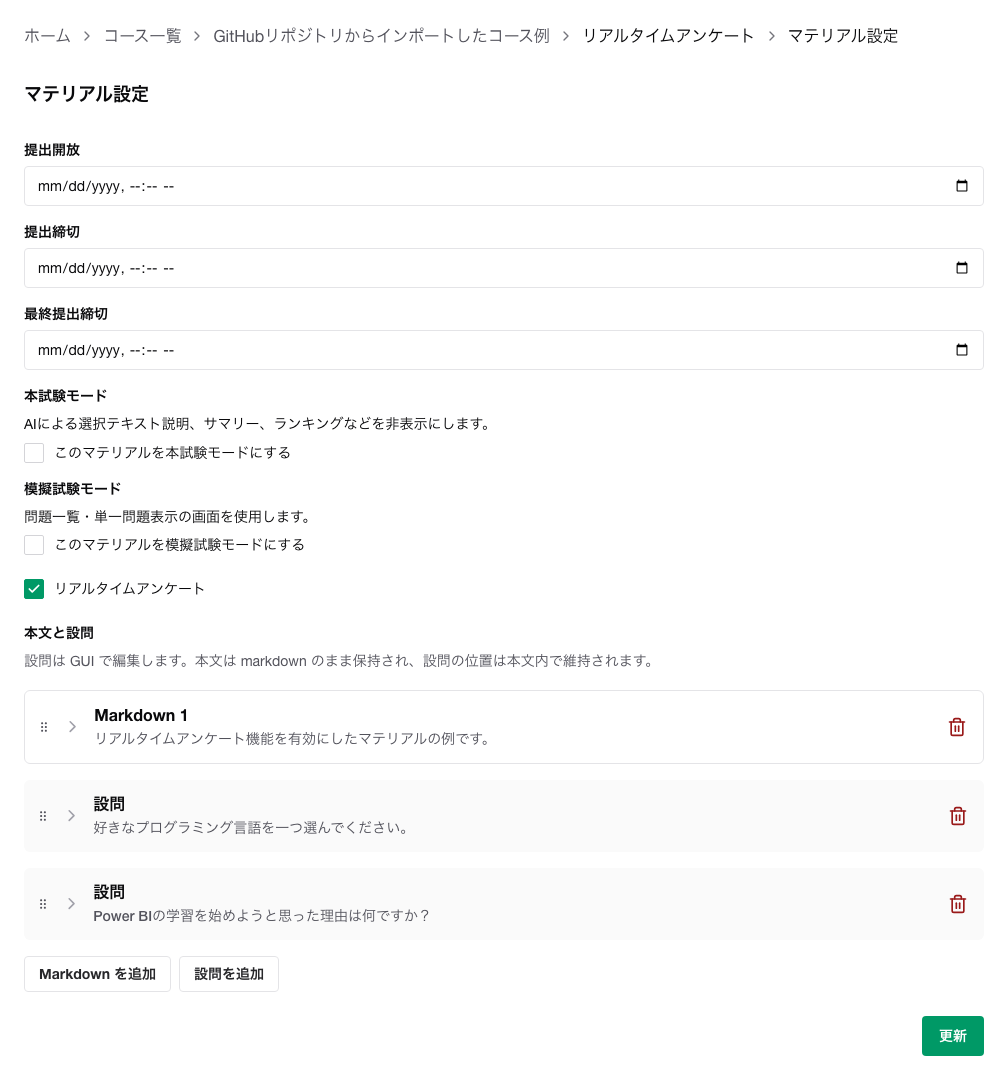
With Edit for teaching materials, you can update the Markdown body and questions, in addition to the submission period and exam settings.
Important Notes
Re-importing a teaching material repository may overwrite your edits.
Therefore, we recommend using edits here only for temporary operational adjustments.
How to Open
- Open the
Course List.
- Open the target course.
- Open
Edit for the target teaching material.
Main Settings
Submission Open
- The date and time when students can start submitting.
- Corresponding parameter:
submissionOpenedAt
Submission Deadline
- Submissions after this date and time are treated as late submissions.
- Displayed in yellow on the monitoring screen.
- Corresponding parameter:
submissionSoftClosedAt
Final Submission Deadline
- Submissions can no longer be made after this date and time.
- Corresponding parameter:
submissionHardClosedAt
Formal Exam Mode
- Hides learning support features such as AI explanations, summaries, and rankings.
- This setting is intended for quizzes and actual exams.
- Corresponding parameter:
isExamination
- When "Allow finishing the exam midway" is enabled, examinees can finish the exam before the final submission deadline. After finishing, they cannot answer or submit until the deadline, and this action cannot be undone.
- This setting is only available when Formal Exam Mode is enabled.
- To use this feature, set the final submission deadline. If it is not set, the finish button will not be shown to examinees.
- Corresponding parameter:
canFinishExaminationEarly
Mock Exam Mode
- Switches to an exam-oriented layout.
- Switches when
Mock Exam Mode is enabled.
Real-Time Survey
- Enables live surveys to be conducted during class.
- Corresponding parameter:
isRealtimeSurvey
Body and Questions
- Add Markdown blocks to edit the body.
- Add question blocks to insert questions in the middle of the body.
- Questions are saved as single-choice, multiple-choice, or free-text.
- For each question, you can configure explanations, hints, whether resubmission is allowed, and whether it is treated as a survey.
- In teaching material Markdown and question Markdown, you can write supplementary instructions for AI after a standalone
<!-- chat --> line. Only one <!-- chat --> can be used in each, and the content after it is not shown to learners.
Differences from File-Based Materials
- For Markdown-based materials, you can edit the body and questions.
- For file-based materials, the body itself cannot be edited on this screen; the focus is on submission periods and mode settings.
Additional Notes
- If the Markdown content and file content conflict, you will be asked which one to keep.
- If a Gemini API key is configured for the organization, you can use the teaching material improvement suggestion feature.
Related Pages
