Setting Class Times
Users with permission to perform this operation
- Organization administrators
- Group administrators
- Members of the teaching material repository
What this does
When class times are set, submissions made outside of class time will be displayed separately on the monitoring screen.
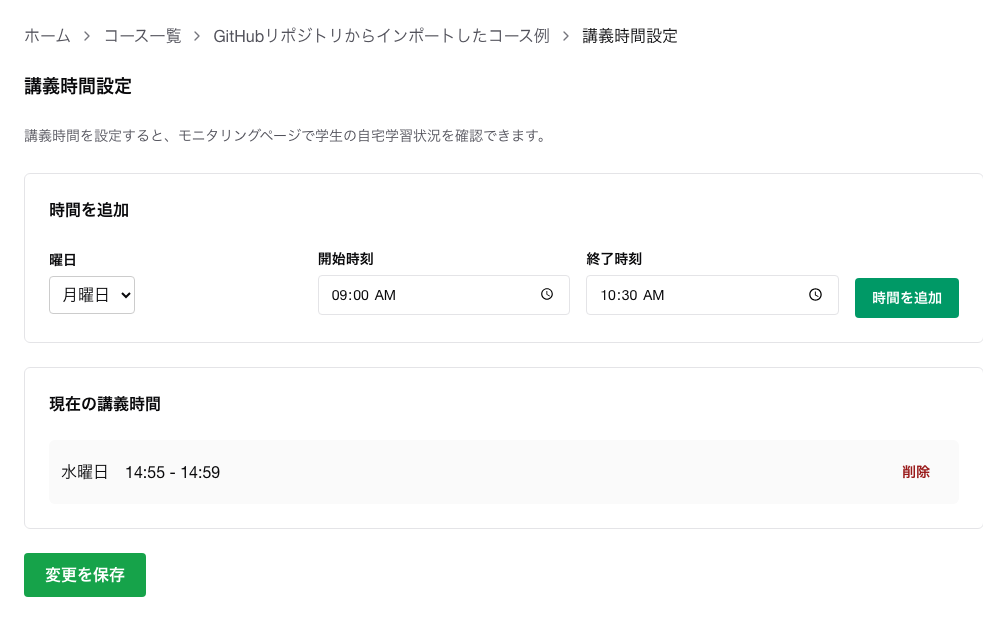
Steps
- Open
Course List.
- Open the target course.
- Click
Class Time Settings.
- Enter the day of the week, start time, and end time.
- Click
Add Time.
- Confirm that it has been reflected in
Current Class Times.
- Click
Save Changes.
Notes
- Since learning outside of class time can also be reviewed, this can be used to track self-directed learning.
- For classes with different days or time slots, you can add multiple entries and then save them all at once.
